Modules
Modules are collections of tools, skills and agents for different steps of your development process and lifecycle. By default, Ellf will guide you through the whole end-to-end process and select the right modules in the order most fitting for your requirements. You can also run individual modules directly as slash commands.
Project Planning
Break your business problem down into actionable steps
Data Annotation
Define label scheme, NLP components and annotate data
Prodigy Recipes
Implement custom workflows for the Prodigy annotation tool
Pattern Generation
Interactively develop patterns and rule-based logic
Model Training
Train and export custom models and components
Question Answering
Ask specific questions and query the knowledge base
Human Support
Get support and feedback from our NLP experts
Coding Handover
Hand over in-app conversations to your coding assistant
Monitoring
Monitor jobs, training progress and cluster health
Platform Operations
Navigate the platform and CLI to perform actions
Project planning
This module helps you break down your business problems and requirements into actionable steps and outlines a project plan, including strategies for data preparation and development, NLP components to use, label schemes, annotation and model training. It will ask follow-up questions as needed to determine the right approach and next steps. This is usually the first step in the Ellf process.
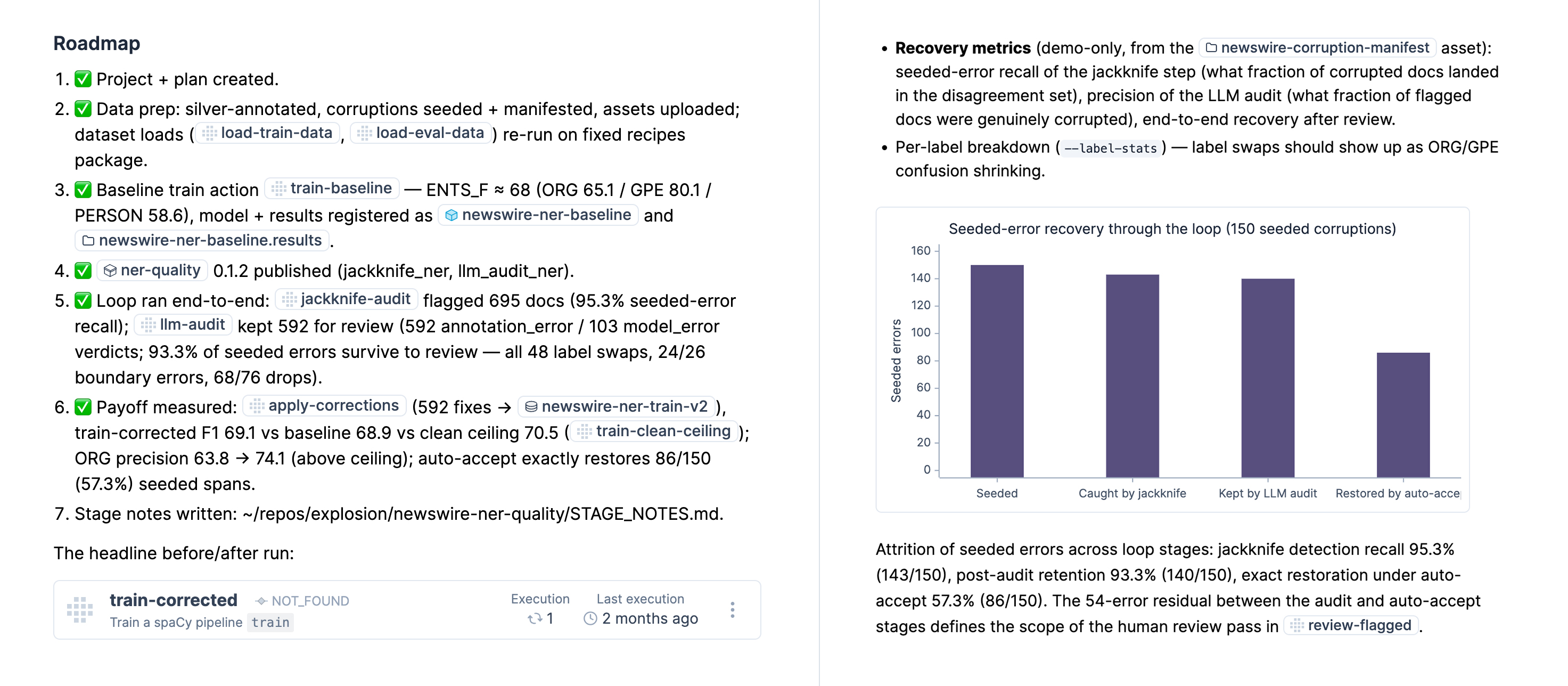
Ellf also uses the plans CLI to store and sync project plans so you can work on them locally in your coding assistant and via the in-app chat. Plans are scoped to Ellf projects and each project can have one or more plans attached to it, for example one plan for each NLP component you’re developing. As you work with Ellf, your project plans are continuously updated to reflect the state and progress of your project and make it easy to collaborate. In the UI, you can view your project plans by clicking Plans in the sidebar.
Project plans use regular Markdown syntax and can also include links and embeds of tasks, actions, agents, services and other resources on the platform and your cluster. Plans also support charts and diagrams to visualize accuracy figures, data statistics or pipeline flowcharts. The agent is instructed to use those sparingly, but you can always ask it explicitly to embed diagrams where applicable.
Data annotation
This module helps you convert your business problem and project plans into the right NLP components, develop the best matching label schemes that are easy to annotate and learn from, and set up automated data annotation workflows. It will start the Prodigy annotation tool if needed and provide you with the setup to scale up your data labelling process by creating tasks in the platform and setting up agents to auto-label data for you.
The data annotation module also incorporates many best practices for creating generalizable categories and implementing the most efficient human-in-the-loop and model-assisted data development strategies, like our guide for optimizing annotation workflows. This information is also available in the knowledge base that you can access via the /ellf-ask module.
Prodigy recipe builder
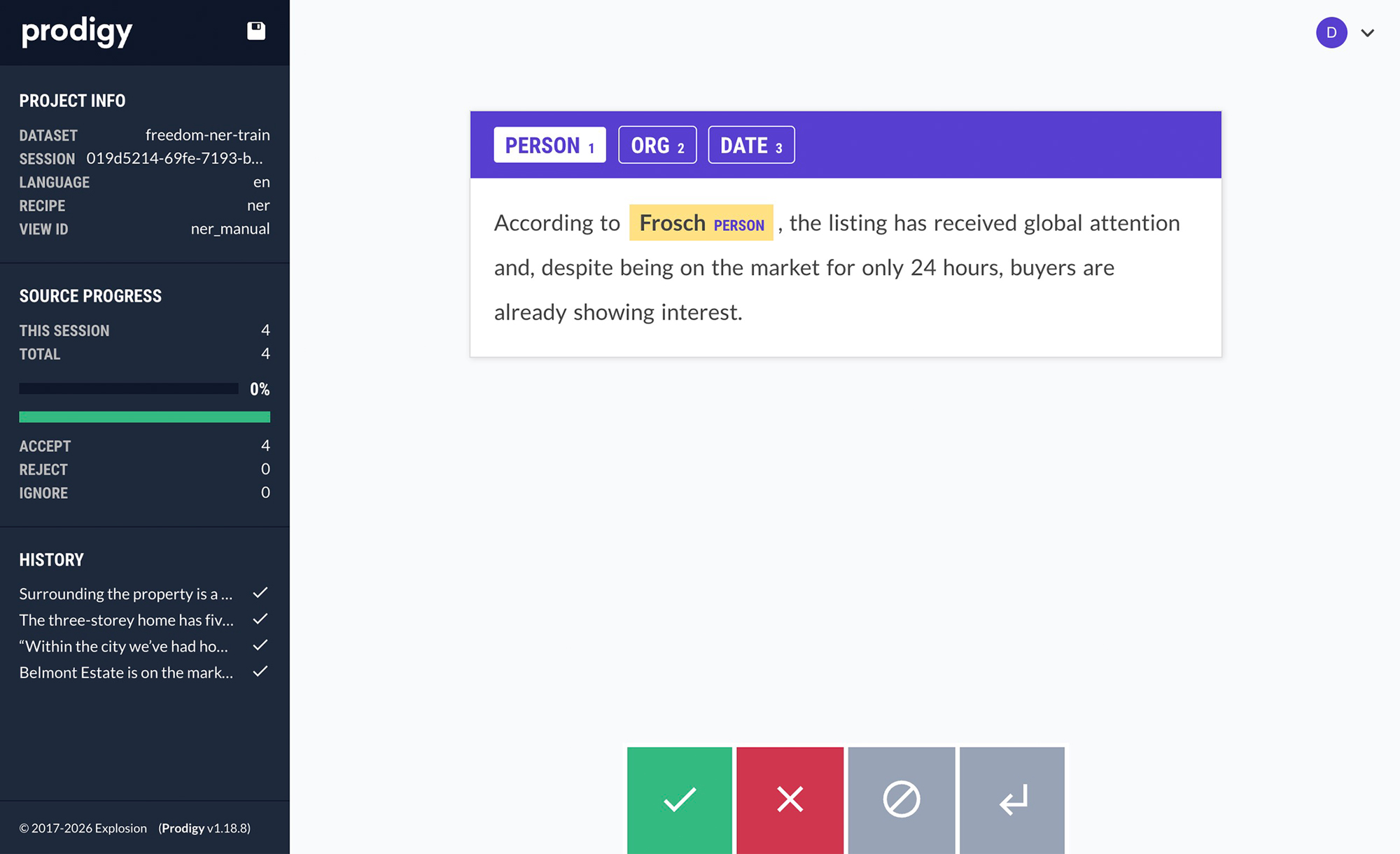
This module makes coding assistants proficient at using the Prodigy annotation tool and implementing custom recipes and interfaces for specific use cases. Ellf will use it if a custom annotation workflow is required for data collection in your project, e.g. during the data annotation step. You can also call this module directly if you already have an annotation goal in mind and need help implementing the workflow and annotation interface for it. For more details, also see the page on Ellf for Prodigy users.
The recipe builder can implement recipes for both the standalone workflow that runs Prodigy locally, as well as Ellf tasks that run on your cluster and let you assign human annotators and autonomous annotation agents in the platform. Compared to the data annotation module, which focuses on annotation strategy, this module specifically targets the Python recipe implementation.
Pattern generation
This module helps you determine which information to extract requires machine learning solutions, and which parts can be reliably extracted using rule-based logic like match patterns, regular expressions or other heuristics for faster and more predictable results. It can also automate the creation of those match patterns and iteratively refine them with alternating precision and recall passes, while asking you for interactive feedback on the results. At the end of the process, the module can provide you with the code or script needed to apply the generated patterns or integrate them into your existing NLP pipeline to combine models with rules.
Model training
This module uses your data to train the best possible small, fast and private model components, e.g. a spaCy pipeline consisting of the previously developed components. Based on your requirements and project plan, it will automatically pick a suitable configuration, embeddings and hyperparameters. It will also log the training results for further analysis and export a loadable model and code to use it in your application. To perform and manage training in the cloud, the module can also set up actions that run on your cluster and use GPU resources if available.
Once your training experiments are running, the module can analyze your training logs and results, interpret and explain them for you, and recommend strategies for next steps and further improvements.
Question answering
This module connects to Ellf’s extensive knowledge base consisting of documentation, code, project examples and advice for different use cases and domains, as well as development best practices and our distilled expertise from 10+ years of solving real-world NLP problems in industry. The knowledge base also includes documentation and examples of Ellf itself, as well as our other tools, spaCy and Prodigy, and their related ecosystems.
Human support
If you ever feel stuck or need human feedback on your project plans and workflow, you can use this module to send us your logs and have them reviewed by one of our NLP experts. Alternatively, you can also export your conversation log to a file and email it to us at support@ellf.ai.
Support requests are reviewed by our team and you’ll typically receive a response within a few business day. The module will always ask for your permission before sharing your conversation logs.
Handover to coding assistant
This module allows in-app chat conversations to be handed over to your coding assistant like Claude Code in order to create and edit files locally and write code. The conversation history can be moved to your cluster, and by default, Ellf will automatically pick up from the latest conversation. You can also call the module explicitly with a conversation ID or select from the available past conversations.
Handover from in-app chat to Claude Code
Under the hood, this module uses the todo CLI to create and manage requests, which can then be picked up by your coding assistant. It can also use the plans CLI to fetch and update your project plans so it has the available context for the given todo.
Monitoring and observability
This module monitors and diagnoses running jobs from your coding environment and the in-app chat. It can check on tasks, actions, agents and services running on your cluster, local training runs, standalone Prodigy servers, and overall cluster health. Instead of dumping raw logs into your conversation, the module produces compact structured summaries with actionable alerts. It covers several monitoring surfaces:
- Training jobs: Tracks loss, dev scores and best checkpoint, and detects problems like overfitting, score plateaus, loss spikes and NaN loss.
- Annotation tasks: Reports task state, dataset growth signals and annotator or agent activity to help you spot stalled or misconfigured annotation workflows.
- Agents: Checks agent state, recent errors and whether the agent is producing work or appears blocked.
- Cluster health: Runs connectivity, cluster-side and node capacity checks to surface degraded state or resource pressure.
Platform operations
This module makes your coding assistant and the in-app chat proficient at navigating the web platform and ellf command-line interface so it’s able to create and manage tasks, actions, agents and services, interact with the cluster, navigate to the right pages and resources, and perform any other actions for you. It essentially makes Ellf good at using itself to its full potential.
Ellf will generally ask you for additional confirmation before creating, running or deleting things for you, and will execute everything under your user account.