When working on NLP projects, you typically need to run lots of things: data processing, annotation, training, evaluation, testing and many more iterative steps. This is hard to solve with only a coding assistant. Ellf comes with a platform that makes it easy to run and monitor your different processes, locally and in the cloud, and collaborate on them with your team.
Projects let you group tasks, actions, agents and services together within your organization, and manage user access and permissions on a per-project basis. For example, if you’re working on a new model or component, you would typically create a project for it and create all related tasks and actions within that project. You can manage projects in the web UI or via the ellf projects CLI.
Within a project, you can create, run and manage tasks, actions, agents and services:
Annotate entitiesSTARTED
Named Entity Recognitionner
Annotations
2452
Annotators
3
Agents
1
Train a pipelineSTOPPED
Train a spaCy pipelinetrain
Executions
42
Last execution
2 hours ago
Auto-labeler for NERSTARTED
Gemini Annotation Agentgemini_agent
Generate PatternsSTARTING
Pattern Generation MCP Serverpattern_gen
The projects dropdown at the top shows all available projects and lets you switch between them, edit the current project and create a new one. Projects require a human-readable name and description shown across the app.
You can also create projects on the CLI via ellf projects create. When successful, it will output the details of the project that was created.
Creating a project
$ellfprojectscreate"My first project""Getting started with Ellf"
id 838e401c-f070-44de-b6a7-3db840e9dc7c
created 2026-01-16 10:25:22.511856+00:00
updated 2026-01-16 10:25:22.511863+00:00
org_id 8b428d0e-b44a-40b3-8886-53a9018f2c81
name My first project
description Getting started with Ellf
Once your project is created, it will show up in the overview in the UI, as well as the list of projects in ellf projects list. You can also get detailed info for a given project or delete a project.
When using the CLI, you typically want to use config project to set the default working project, so you won’t have to specify the --project argument every time you run commands. You can also define the working task, action, agent or service this way. In the web app, the command bar at the top shows the CLI command that corresponds to the current page or view, making it easy to switch between using the app and CLI.
If you’re working on the CLI, you can use the ellf config command to configure the default project, task, action, agent or service so you don’t have to keep repeating the name or ID in the commands. For example:
Default project set as 838e401c-f070-44de-b6a7-3db840e9dc7c
You’ll then be able to leave out the --project argument on other commands and it will be picked up automatically. You can do the same to set the current working task, action, agent or service.
Projects also contain plans created by Ellf’s project planning module. These are Markdown documents that are continuously updated and outline the end-to-end development plan, including step-by-step workflows and higher-level strategic goals. Ellf refers to the project plan across its different modules and also uses it to keep the in-app chat and your local coding assistant in sync.
You can view project plans in the UI via the Plans page or using the plans CLI. Plans are also versioned with tracked changes as the agent or user makes edits to them.
Project Plan: Fraud Report Classifier
NLP Project Plan: Fraud Report Classifier
Problem Statement
Build a pipeline that processes analyst-written fraud investigation summaries and produces four outputs: fraud type (multi-class, 6 labels), affected product, urgency level, and legal escalation flag. Urgency and legal escalation are derived from business rules applied downstream of model predictions — not model outputs themselves. Starting from scratch on annotation.
Pipeline Overview
Analyst report text
│─→ [Fraud Type Classifier] ← supervised textcat, 6-class exclusive
|─→ escalate: urgency == HIGH → legal team routing
Key architecture decision: Urgency and legal escalation are policy decisions, not language-understanding tasks. Internal thresholds ($100K, insider fraud type) are encoded as rules owned by the fraud team, not embedded in model weights.
Components
Component
Approach
Rationale
Fraud type
Supervised textcat, 6-class exclusive
Core NLP task; domain-specific; needs training
Social engineering vector
Supervised textcat, binary
Method flag separate from outcome type; binary is fast to annotate
Product extraction
PhraseMatcher rules
Analyst reports name products explicitly; rules are fast and auditable
Amount extraction
Regex / spaCy MONEY entity
Structured format; rules are sufficient
Urgency
Business logic rules
Thresholds ($100K, fraud type) are policy, not language
Social engineering: Binary vector flag, not a fraud type label. It’s a method, not an outcome.
Evaluation-first: 100-doc test set held out before annotation begins.
Project Plan: ADR Detection in Medical Literature
NLP Project Plan: ADR Detection in Medical Literature
Problem Statement
Detect and extract structured adverse drug reaction (ADR) mentions from ~500 biomedical paper abstracts (currently in PDF/mixed format), producing typed drug-ADR pairs suitable for ingestion into a pharmacovigilance database.
Pipeline Overview
PDF/mixed source
  └─> [Phase 0] Text extraction (Docling / pdfplumber + spacy-layout)
        └─> [1] DRUG NER  (scispaCy BC5CDR baseline → fine-tune if needed)
        └─> [2] ADVERSE_REACTION NER  (same model, separate eval pass)
              └─> [3] Relation linking (sentence co-occurrence + negation → NLI reframe if needed)
                    └─> [4] Normalization (DrugBank/RxNorm, MedDRA) — business logic, not ML
Data Strategy
~500 abstracts in PDF/mixed formats — text extraction required before NLP work
Nothing annotated yet
Plan: LLM pre-annotation (GPT-4 via spacy-llm) → expert correction in Prodigy
Set aside ~100 abstracts as held-out eval set before any annotation begins
Target: ~300–400 annotated abstracts for NER training
Annotation Plan
Schema
DRUG — drug/substance mention spans (generic, not role-specific)
ADVERSE_REACTION — adverse reaction term spans (generic)
Relations: drug-reaction pairs (separate pass after NER is stable)
Schema principles
Do NOT use composite labels like “DRUG_CAUSING_ADR” — couple NER with role assignment is a mistake
Normalization to DrugBank / MedDRA is business logic downstream, not part of the annotation schema
Workflow
Pilot: 50–100 abstracts, domain expert annotates DRUG spans only (correction of BC5CDR predictions)
Evaluate BC5CDR baseline on same set — decide how much fine-tuning is needed
Relation pass: link drug-reaction pairs within sentences
Train first model after pilot, run training curve, validate learnability before scaling
Team
1–2 domain experts (clinicians / pharma researchers) — ideal small expert team
Prodigy on Ellf cluster for annotation
Evaluation Strategy
Hold out ~100 abstracts as a fixed test set before training starts — never train on these
Evaluate NER with token-level and span-level F1, split by entity type
Rule-of-10: distinguish 85% vs 90% accuracy needs ~1000 span-level eval examples — plan accordingly
Relation evaluation: precision/recall on drug-ADR pairs (exact match: both spans + link correct)
Run training curves after pilot to decide whether more annotation helps or schema needs revision
Baseline: evaluate scispaCy BC5CDR out-of-the-box before annotating anything
Roadmap
Phase 0 — Text extraction (prerequisite)
Extract clean abstract text from PDFs
Tools: Docling, pdfplumber, or spacy-layout
Output: plain text files per abstract, ready for annotation
Phase 1 — Baseline evaluation
Run scispaCy en_ner_bc5cdr_md on 50 sample abstracts
Measure what it gets right on DRUG and ADVERSE_REACTION before committing annotation budget
Phase 2 — NER annotation + model
LLM pre-annotation → expert correction in Prodigy (ner.correct)
Single-label passes: DRUG first, ADVERSE_REACTION second
Train after pilot, run training curve, scale only if curve is still rising
Phase 3 — Relation extraction
Start with rule-based co-occurrence + negation detection as baseline
Escalate to NLI reframe (“drug X caused reaction Y” → entailed/neutral/contradicted) if needed
Phase 4 — Normalization (business logic)
Map DRUG spans to DrugBank / RxNorm
Map ADVERSE_REACTION spans to MedDRA
This is a lookup layer, not a model — keep it separate from NLP components
Next Steps
Solve text extraction (Phase 0) — this is a blocker for everything else
Evaluate scispaCy BC5CDR on a sample before annotating
Set up Prodigy annotation task on Ellf with LLM-assisted pre-annotation
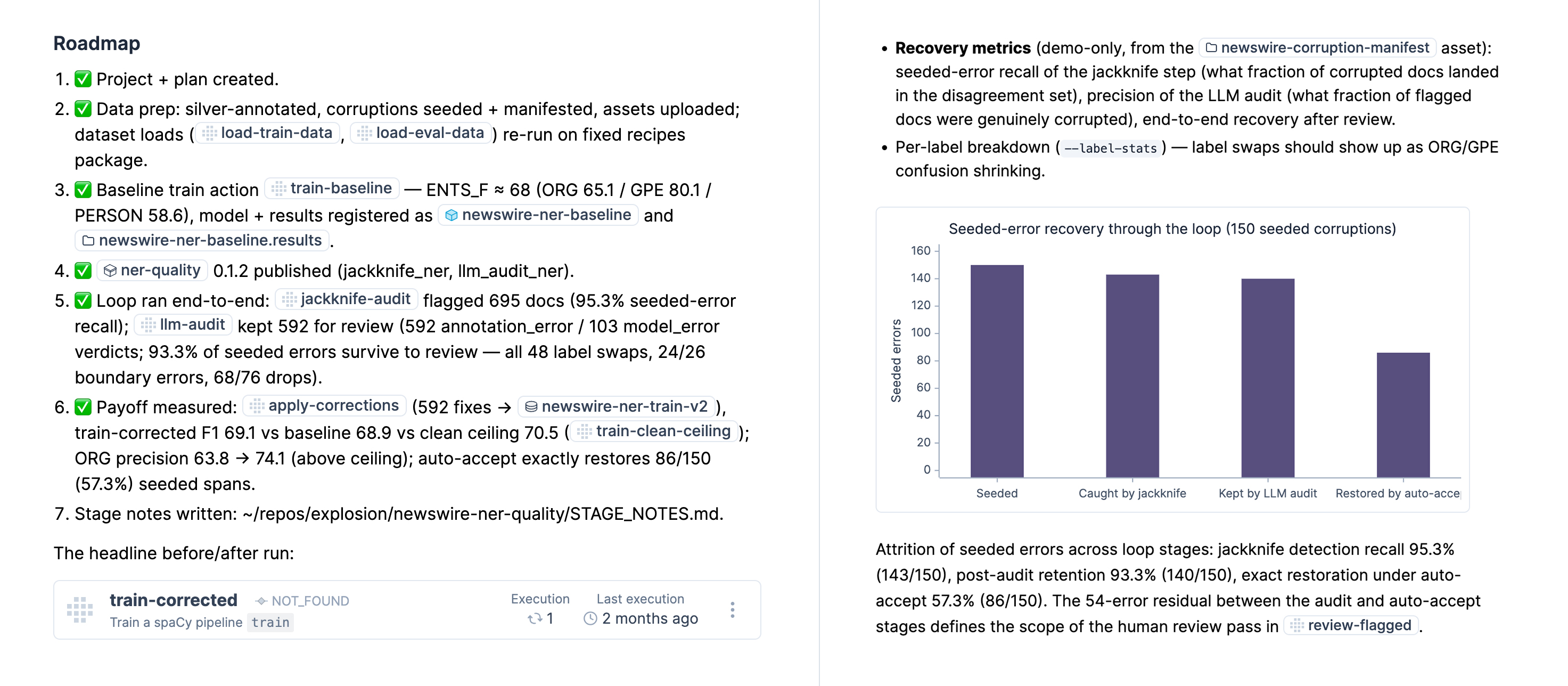
Project plans also support special Markdown links using UUIDs of concepts in the platform: projects, tasks, actions, agents, services, assets, users and other project plans. In the rendered project plans in the platform, these will automatically be turned into cross-reference links. If the link to a task, action, agent or service is provided on its own newline, it will be turned into a more full-featured embed with more details.
Internal links and embeds in project plans
Source: @[Assets/ag-news-train](019e3735-a7fc-7542-9a43-eb120c36e8d6) / @[Assets/ag-news-eval](019e3735-b062-7c82-ab16-9705a0d0bc02) assets already on the cluster (JSONL, news headlines + abstracts).@[Tasks/review-flagged](019eb373-4452-7443-8124-5bae5822ff8a:019eb142-83fb-7633-a2d2-8e0c3e17d973)
You typically don’t have to include these links manually and they’ll be added automatically by the agent as it creates things in the platform and updates the project plan accordingly.
Project plans also support charts and diagrams powered by Mermaid, using a straightforward syntax within mermaid-fenced code blocks. This enables Ellf and your coding agent to visualize accuracy figures, data statistics and pipeline flowcharts. The agent is instructed to use visualizations very sparingly when authoring project plans, but you can always ask it explicitly if there’s data you want to see in a diagram.
Project plan details with cross-reference links and visualizations
The platform includes a chat widget for chatting with Ellf from any point in the app. The agent is able to perform common actions and navigate the app for you. Typing @ lets you reference available resources, including tasks, actions, agents, assets, datasets and registered users in your organization.
TasksText classification
TasksAnnotate entities
AgentsGPT-5
Datasetslegal-contracts
Datasetsmedical-records
AssetsDocuments
Assign @Agents/Gemini to @|
Things the in-app chat can do include:
answer questions about project planning and NLP strategy
review the project and suggest next steps, improvements or ideas
pre-populate the form for creating new tasks, actions, agents and services
start and stop tasks, actions, agents and services
assign agents and users to tasks
compute statistics about data and running jobs
navigate to specific pages and sub-pages
When you ask the agent to create, run or delete things for you, it will ask for an additional confirmation. Under the hood, it will perform actions under your user account, which means that the agent only ever has access to what the user can access.
At some point during a conversation, the agent may need to go back to developing locally and writing code. In that case, you can hand over the conversation to your coding assistant like Claude Code via the /ellf-todo command.
Handover from in-app chat to Claude Code
Can you implement this?
Sure! Here’s the handoff summary:
Request ID
523060d8-b2db-4fd5-b541-5ee119007501
Status
planned
Description
Write loader.py for documents from data warehouse
In your local Claude Code, run /ellf-todo to pick it up – it will load our full conversation context automatically.
⏺︎Context summary: Phase 1 of an e-commerce aspect extraction project. The task is to write loader.py for the internal data warehouse API that segments sentences and yields {id, text, date} dictionaries.
This will load the conversation and continue it in your coding assistant with the ability to create files and develop code. By default, it will pick up and use the latest conversation, but you can also call the command explicitly with the conversation ID or select from the available past conversations.
Ellf ships with our popular annotation solution Prodigy for efficient data labelling, and brings it into a collaborative cloud environment. When you start a task, Ellf will spin up the annotation server using one of the available recipes for NLP tasks like span annotation, text classification or relation extraction. You can then assign human annotators as well as automated annotation agents, and view their progress in the app and on the CLI using the tasks command. The annotation process runs entirely on your cluster, so your data stays fully private and under your control.
Annotate entitiesSTARTED
Named Entity Recognitionner
Annotate categoriesSTOPPED
Text Classificationtextcat
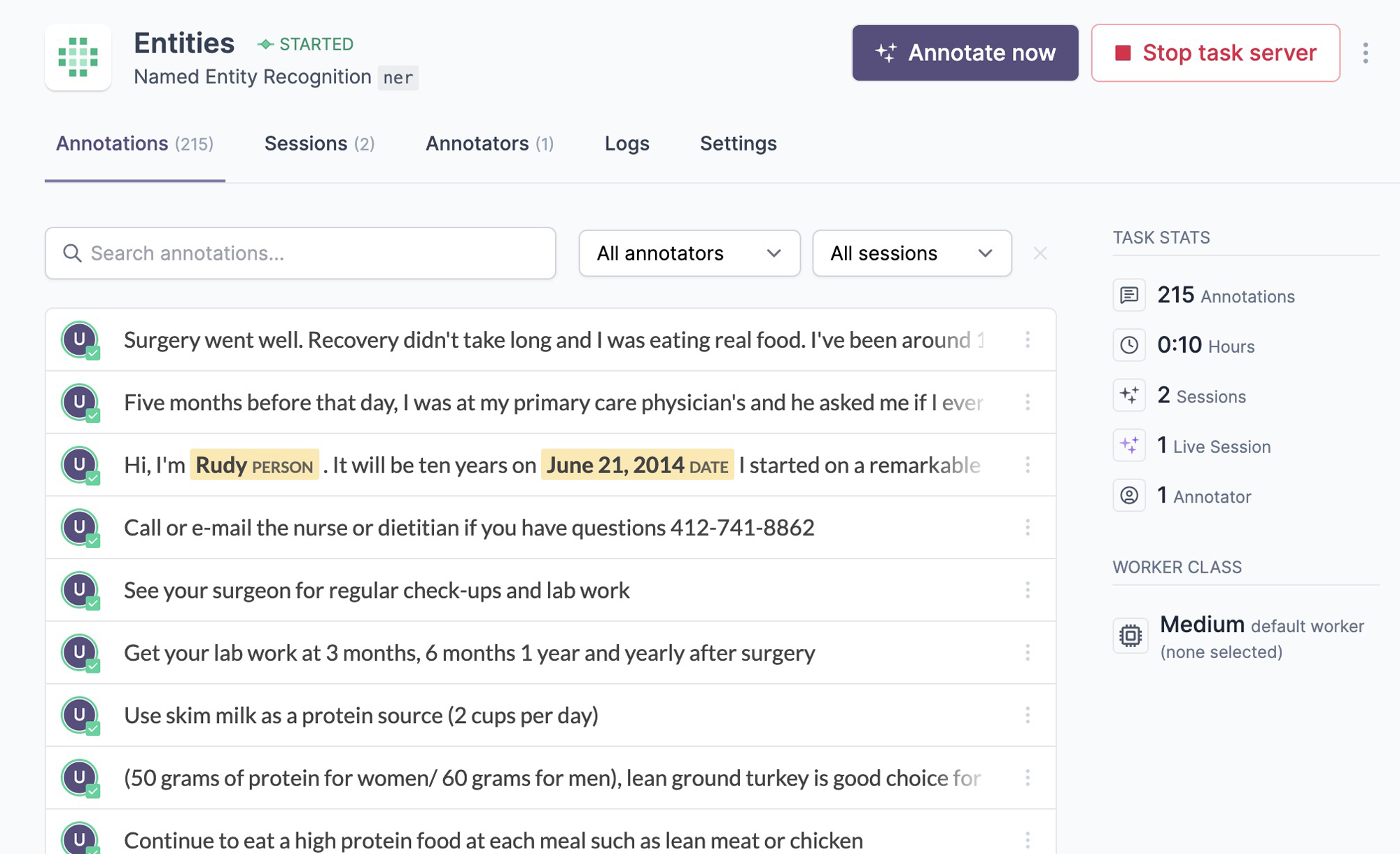
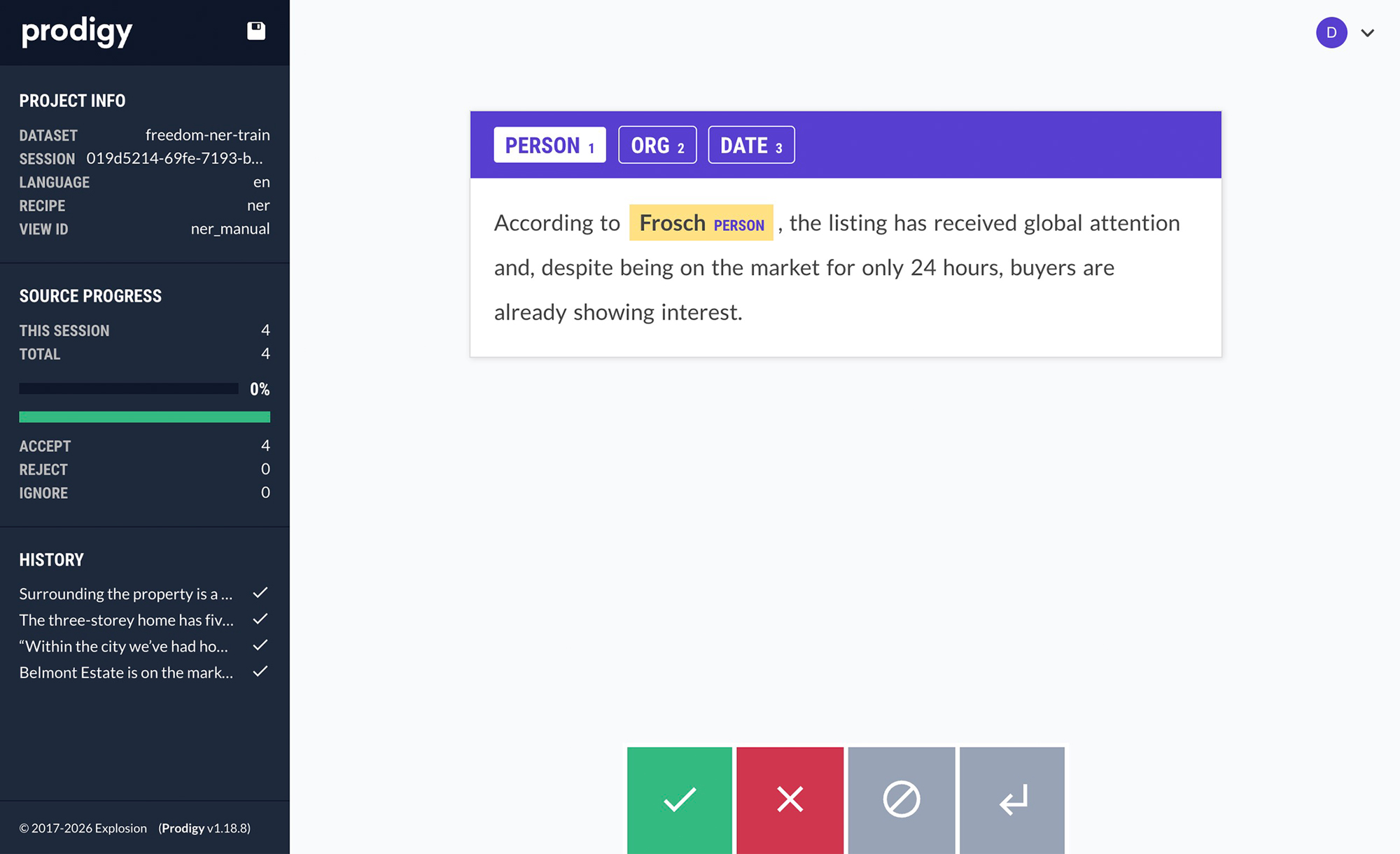
The app shows you an overview of your available tasks, running and completed annotation sessions, as well as the created data. To create annotations yourself, you can click the Annotate now button on the task page. Admins and developers can always annotate, and annotators assigned to a task are able to access the annotation UI only. To add them, click Add annotators in the app or use the users assign command.
Annotated examples in the appProdigy annotation UI
Ellf’s data annotation module also makes your coding assistant proficient at annotation best practices and helps you design your label scheme, structure your annotation task and configure the right annotation interface. The Prodigy module knows Prodigy’s developer API and helps you implement fully custom workflows and interfaces.
Ellf fully integrates with Prodigy and adds a range of features to help you scale up and automate your data development. This includes a collaborative annotation environment with user management to assign annotators and agents to tasks, and the ability to configure annotation tasks via a UI form or your coding assistant. Ellf ships with built-in recipes covering all common Prodigy workflows and also lets you add your own custom recipes using the same familiar Python syntax. Actions then make it easy to train models and run experiments using your data. For more details, see the page on Ellf for Prodigy users.
Under the hood, annotation tasks are powered by recipes, Python functions that configure the data, workflow and interface to use. Ellf makes it easy to implement and add your own, including with the help of your coding assistant.
Recipes can also define custom interfaces that combine existing UI components or implement custom interactive UIs using HTML, CSS and JavaScript and event hooks. In your coding assistant, you can use Ellf’s Prodigy module to specify your requirements and have it build the right interface for you. For more details and an example, see the page on Ellf for Prodigy users.
While Ellf ships with built-in and first-class support for our annotation tool Prodigy, you can also plug in other tools, including your own internal annotation apps. Ellf provides several options to implement this type of integration.
Services let you run and host any custom apps and APIs on your cluster and manage them within the platform. This lets you add and run your annotation tool within Ellf. Your tool can either save data in Prodigy’s JSON format and add created annotations to the built-in database programmatically, or it can use a separate database running on the cluster or another remote server. In your Ellf workflows, you can then import or fetch the annotated data and use it for training, analysis or further processing.
Alternatively, if your annotation tool is running outside of Ellf and your cluster, you can use actions or a service webhook to automatically import your annotated data and save it as a data asset. As new data comes in, a new version of the asset is published and available in the platform, e.g. to use for training a model.
Organizations are your top-level account for Ellf and include your team members and projects. You’d typically have one organization for your company, although it’s also possible to have multiple orgs for different groups and departments if you need more fine-grained access control. To invite users to your organization, you can click SettingsInvite in the platform or use the users CLI.
If you’re part of multiple organizations, you can switch between them using the org dropdown in the top bar of the app. When you run login on the CLI, you’ll also be prompted to select the organization to connect to.
Selecting an organization during login
ℹ Multiple organizations are available:
[1] ACME Inc. (bec7a6a2-aa6a-4e63-9bc9-fc5b249aef26)
[2] Research Department (742ebbea-866d-4075-b0ff-4ce1513c5a3b)
Users added as annotators can be assigned to one or more tasks to give them access to the annotation UI, and they’ll receive an email notification. You can manage annotator assignment in the Annotators tab or the users overview in the app, or via the users assign and users unassign commands.
Organization admins and developers can always view and annotate tasks, so they don’t need to be added and assigned explicitly.
Auto-annotation agents will show up just like users and can be assigned in a similar way: either via the Agents tab or the agent page in the app, or via agents assign.
Ellf provides three basic roles for users: Administrator, who has access to everything and can manage the organization, Developer, who has access to everything needed for working with and customizing Ellf, and Annotator, who only has access to the annotator dashboard and annotation UI for projects and tasks they’re added to. When inviting users, you can specify the role in the UI or via --role in users invite.
Administrator admin
Developer developer
Annotator annotator
Manage organization and billing
Invite developers and annotators
Access projects dashboard
Access annotator dashboard
Manage all projects
Manage project they’re in
Create and manage tasks, actions, agents and services
Upload data and code to cluster
Manage data and code on cluster
Add new clusters
Create annotations
About developer access to the cluster
Developers need to be able to upload code to the cluster and run it, so there’s no point in restricting their access within the cluster, since this could be circumvented by code anyway. If you need more fine-grained permissions for different cluster resources, you can set up and connect multiple clusters.
The in-app chat agent will perform all actions as the currently authenticated user, so it is only able to do what the user has access to.