Tasks, Actions, Agents & Services
Use Ellf to set up tasks, actions, agents and services for you
If you’ve connected Ellf to your coding assistant, it will be able to create and start tasks, actions, agents and services for you. You can also use the in-app chat and reference resources via @, for example to start a task using a data source, train from a dataset or assign an agent to a running task.
Tasks
Tasks are workflows that preprocess and queue up data for annotation or review and start the annotation server. They are created from a recipe, a Python function describing the workflow and its available settings. You can also think of a task as an instance of a given recipe with a specific configuration. Tasks can be created in the UI or via the CLI and once started, annotators will be able to connect to them and create annotations.
Annotate entitiesSTARTED
To create a new task, you can navigate to TasksNew task in the UI or use tasks create on the command line. The available settings are automatically converted into a web form and CLI arguments.
$ellftasks
create
ner"Annotate entities"--dataset "NER News"
--input "News Headlines"
--label PERSON,ORG,PRODUCT,LOCATION
--model.name en_core_web_trf
To start a task, you can run tasks start with the name or ID of the created task:
This will start the annotation server and will allow human annotators and annotation agents to connect and create data. Each time an annotator connects to the interface, a new session is created and the annotations and sessions can be viewed in the app. You can add annotators and agents in the UI or via users assign and agents assign.
Annotations are saved into the provided dataset, which can then be used by other tasks and actions, e.g. to review the data or train a model, or exported to a file.
Review and correct dataSTOPPED
Train a pipelineSTARTING
Actions
Actions are workflows that execute any logic and exit. They’re created from a recipe, a Python function describing the workflow and its available settings. You can also think of an action as an instance of a given recipe with a specific configuration, similar to jobs running in a CI system like GitHub Actions. Actions can be created in the UI or via the CLI and have access to all resources on your cluster, so they can be used to train a model from your data, perform data analysis, trigger deployment or integrate Ellf with other tools and services.
Train a pipelineSTARTED
To create a new action, you can navigate to ActionsNew action in the UI or use actions create on the command line. The available settings are automatically converted into a web form and CLI arguments.
To start an action, you can run actions start with the name or ID of the created action:
This will create a new execution, run the code and save all output to the logs, which you can access via the Logs tab or actions logs. Actions can have many executions over time – for instance, for regular training runs, end-to-end testing, deployment or data import and export.
To check the status of a running action via your coding assistant and view a summary, you can use the monitoring module. If you’re using an action to train a model, Ellf is also able to analyze and interpret the logs via the model training module – for example to detect potential problems like overfitting and suggest solutions.
Agents
Agents are autonomous workers and annotators that can be assigned to tasks. They’re created from a recipe, a Python function describing the agent’s intended behavior, its available settings and the type of work it’s specialized for. Agents are typically powered by LLMs and can use models running on the cluster or access them via APIs. When assigned to an annotation task, an agent will run in the background and automatically create annotated data in its own dataset.
Auto-labeler for NERSTARTED
To create a new agent, you can navigate to AgentsNew agent in the UI or use agents create on the command line. The available settings are automatically converted into a web form and CLI arguments. If API keys are required, you can use Ellf’s built-in secrets feature.
$ellfagents
create
gemini_agent"My first agent"--model gemini-2.0-flash
--api-key GEMINI_API_KEYTo start an agent, you can run agents start with the name or ID of the created agent:
Once started, the agent will automatically discover its assigned task servers, fetch tasks, annotate them using the logic defined in the recipe, and submit the results. Each agent runs in its own session and creates annotations in the task’s dataset, just like a human annotator would. You can assign agents to tasks via AgentAdd to tasks or TaskAdd agents in the UI or using agents assign on the CLI.
To unassign an agent, you can remove it from a task in the UI or via agents unassign. This will only remove the assignment and keep all annotations the agent has created.
Agents support two optional settings that control their runtime behavior: poll_interval sets how frequently the agent checks for new tasks (in seconds), and idle_shutdown_seconds configures how long the agent will wait without tasks before shutting down automatically. These are defined as parameters in the agent recipe and can be configured when creating the agent. For details on building your own agent recipes, see the recipe development guide and the @agent_recipe API reference.
Use Ellf to iterate on label scheme
To make the most of annotation agents, its crucial to have a well-defined and consistent label scheme. You can use Ellf’s project planning and data annotation modules to guide you through the process, before starting an annotation agent or incorporating human annotators.
Services
Services are long-running background processes like REST or MCP apps and APIs that can also be used by your coding assistant, or tasks, actions and agents in Ellf. They’re created from a recipe, a Python function describing the setup and its available settings. Services can also expose web apps, so you can use them to host demos, dashboards or other custom apps and tools on your cluster.
Generate PatternsSTARTED
To create a new service, you can navigate to ServicesNew service in the UI or use services create on the command line. The available settings are automatically converted into a web form and CLI arguments.
To start a service, you can run services start with the name or ID of the created service:
Once a service is running, you can use the web UI or services url command to get its bearer-token-authenticated URL. This mints a fresh 90-day token and formats it together with the service’s public URL, ready to drop into an MCP client config or curl invocation.
$ellfservices
url
"My first service"✔ URL: https://yourorg.ellf.run/services/3f2a.../
Token: eyJhbGciOiJSUzI1NiIsInR5cCI6IkpX...
Expires at: 2026-09-23T11:04:00+00:00
Try it: curl -H 'Authorization: Bearer eyJhbGc…' https://yourorg.ellf.run/services/3f2a.../
The URL stays stable across stop/start cycles, so an MCP client config that points at it keeps working even after the service is restarted. If a token ever leaks, services rotate-token mints a fresh one without printing the URL again. Existing tokens stay valid until they expire.
Opening a service in the browser
Services built for people rather than machines – dashboards, demos, notebook servers – can be declared with auth="session" in their recipe. For these, the service page in the web UI shows an Open in browser button while the service is running: click it and the service opens in a new tab. Access is limited to logged-in members of the service’s project, and visiting the service URL directly (e.g. from a bookmark) redirects you through the app to sign in first. Bearer tokens keep working alongside, so the same service can also be called by machines.
Connecting an MCP client
For a service that exposes an MCP server (like the built-in pattern generation service), drop the URL and token into your MCP client config. The exact file depends on the client, but the shape is the same – a streamable-HTTP server with the bearer token as a header:
{
  "mcpServers": {
    "pattern-gen": {
      "url": "https://yourorg.ellf.run/services/3f2a.../mcp",
      "headers": {
        "Authorization": "Bearer eyJhbGciOiJSUzI1NiIsInR5cCI6IkpX..."
      }
    }
  }
}
Your coding assistant can then call the service’s tools directly. Because the cluster enforces authentication for you, a request without a valid token is rejected before it ever reaches the recipe.
End to end service setup and usage
To create a new service, you can use the services create command or click New Service in the web app. If you’ve created a service with --no-start, you can also run start to start it manually. To build your own service – an MCP server, REST API, or a browser app like a dashboard – see the service recipe guide and the @service_recipe API reference.
$ellfservices
create
pattern_gen"Pattern server"--api-key GEMINI_API_KEY
Use Ellf to integrate your existing apps for you
Services are a great way to integrate apps like dashboards that have access to data and model resources on your cluster, or to set up webhooks for other tools and platforms. If you’ve connected Ellf to your coding assistant, it will become proficient at recipe development and the Python API, and can implement these integrations for you.
Workers
Task, actions, agents and services can have different cloud hardware requirements and may require a high-performance CPU or GPU to run or train machine learning models. When starting a job, you can customize the worker class to be used so that the cluster can provision the required workers. For example, you can change the worker used by an action by clicking the arrow on the Start action button or by setting the --worker-class argument on the CLI.
By default, the cluster is set up to provide the workers base, small, medium and gpu. See the cluster documentation for more details on their specs and how to define custom workers.
Annotation sessions
Once a task is running, annotators with access to it can navigate to it in their dashboard and open the annotation UI. You’ll be able to see their work and monitor the activity as it happens. You can also click the Annotate now button on the task page to annotate yourself. A session counts every time a user opens the annotation UI, until they navigate away from it. This means that the same user can start multiple sessions over time and create annotations during those sessions.
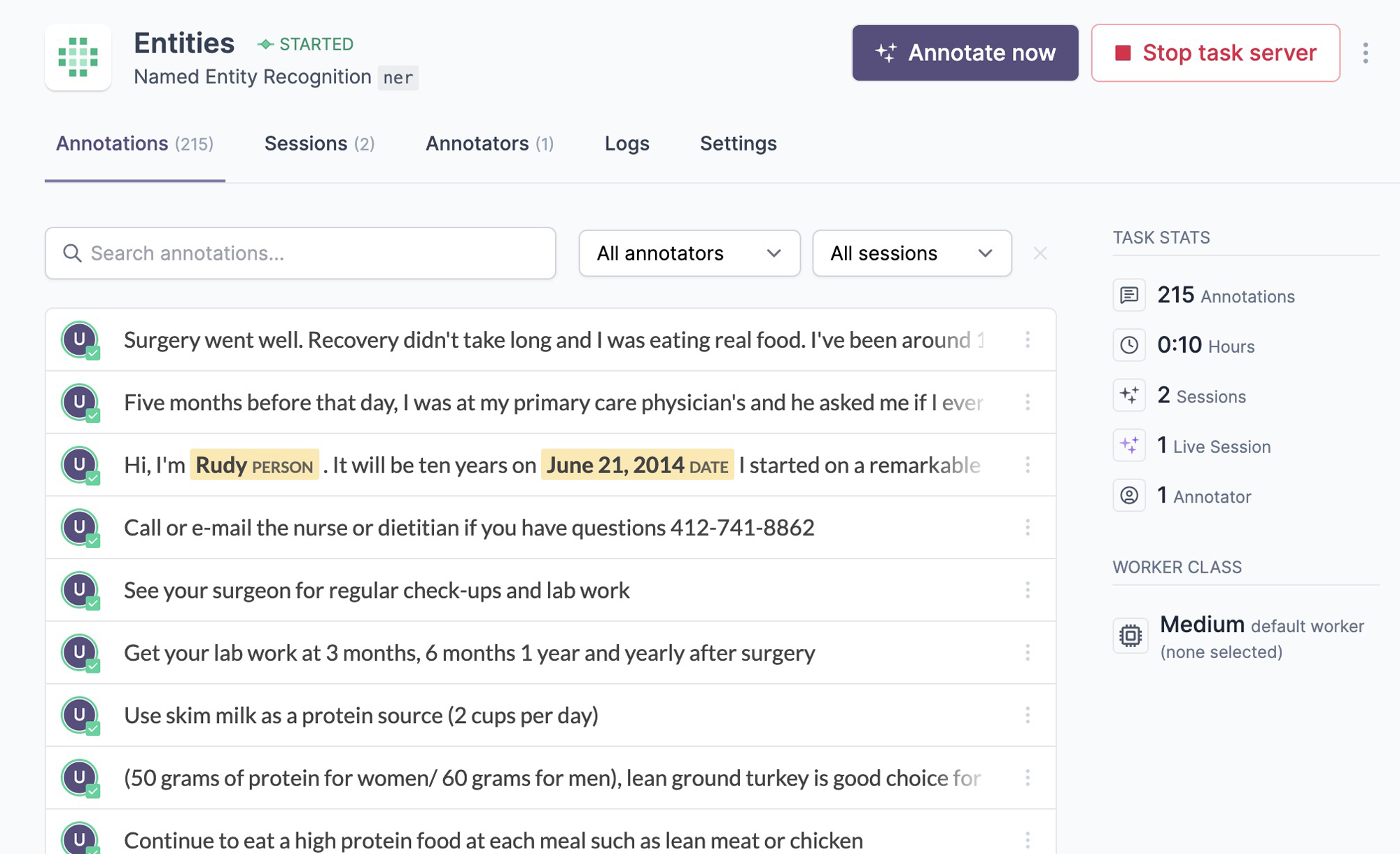
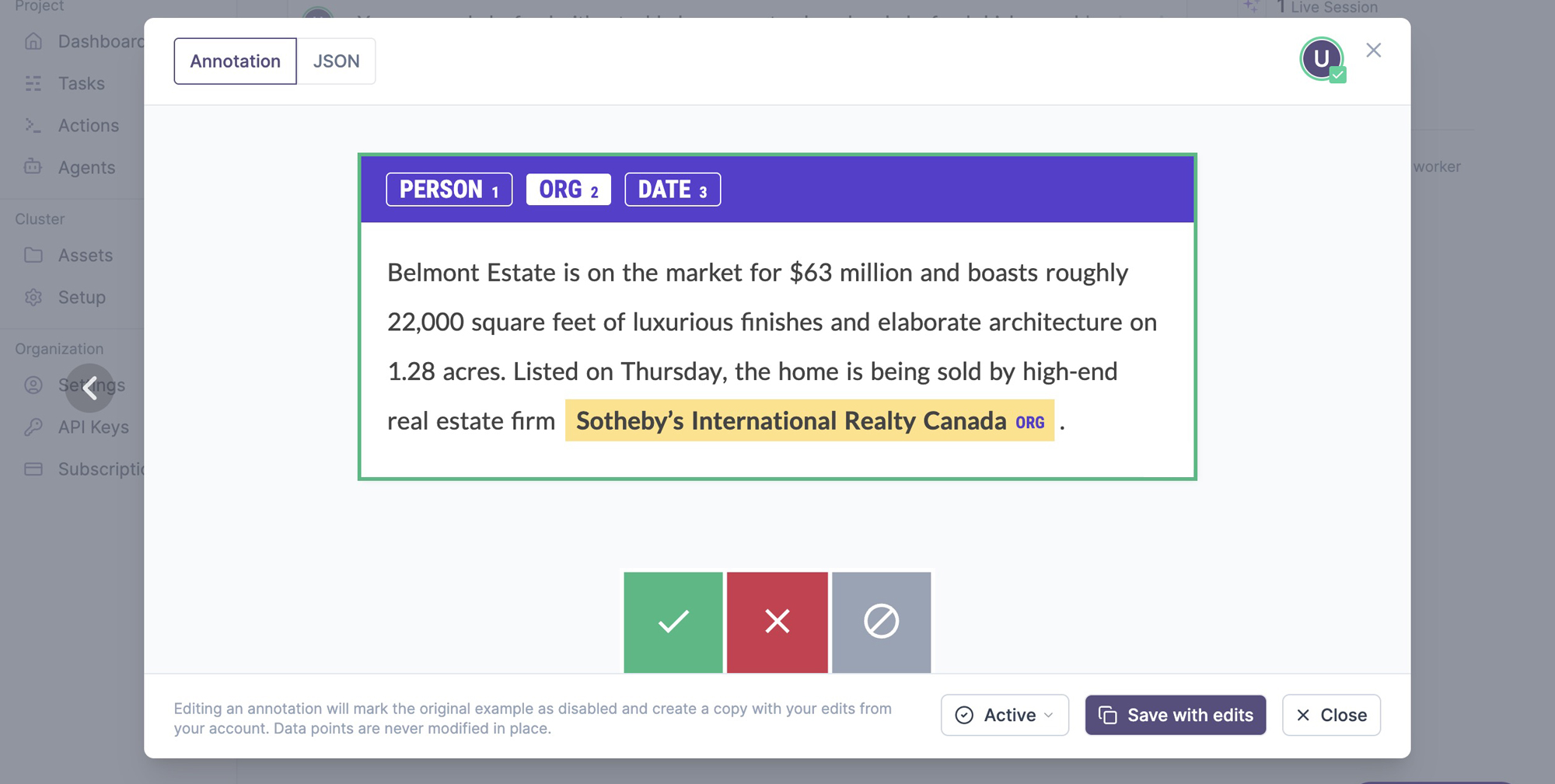
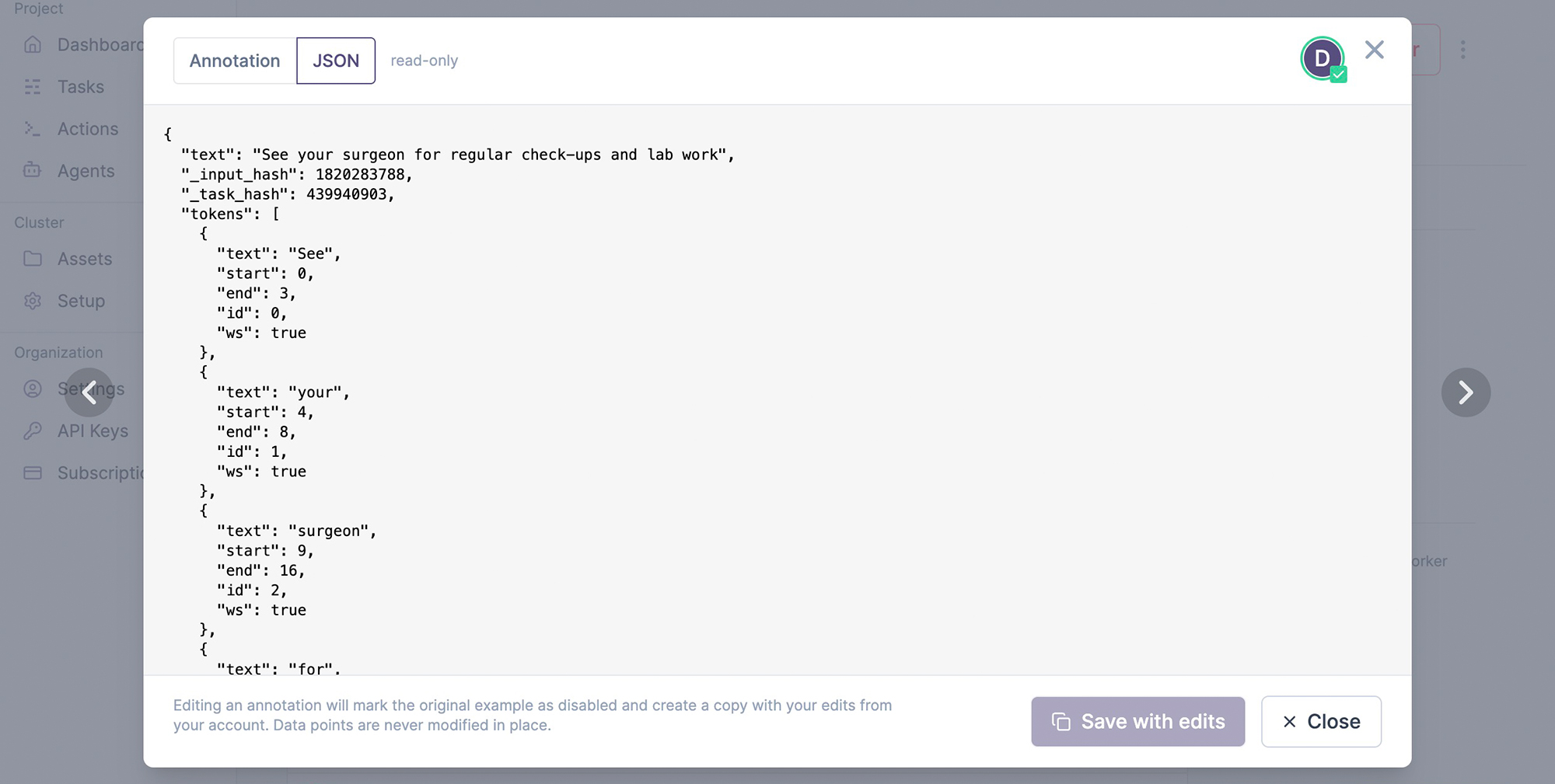
The annotations tab lists the annotated examples with an inline preview. On click, it shows the example and its underlying JSON data, which depends on the data type and interface used. Editing an example will create a copy, save it from your user account and mark the edited example as disabled, so it’s excluded from any further processes. Once an example is added to the database, it can never be changed in place. This ensures that no data points are lost and you’ll always be able to compute accurate metrics like inter-annotator agreement.
Monitoring and observability
The monitoring module lets you check in on the status of your running tasks, actions, agents and services. It can report scores and potential problems for actions like model training, task state, progress and activity for annotation tasks and annotation agents, as well as the overall cluster health.
› /ellf-monitor How’s the NER training going?⏺︎Job ner-product-names-v2 (action)State running — step 800 Best score 0.81 (ents_f) at step 720 Train loss 0.52 (stable) Alerts None
Training looks healthy. The score has been improving steadily and there are no signs of overfitting or loss instability.
Checking on a task via the in-app chat
| Field | Value |
|---|---|
| Status | ready |
| Recipe | ner (Named Entity Recognition) |
| Project | Company Reports Analysis |
| Labels | PERSON, ORG, DATE |
| Dataset | company-reports-ner (kind: ner) |
| Input | Reports 2026 Corpus |
| Created | 2026-04-14 by Alex |
| Annotate URL | https://app.ellf.ai/annotate/019d8cd3-5051-7313-a930-7319c0237464 |
Status: Task is provisioned and ready to annotate — no errors, no related actions yet. No intervention needed. Next step is to open the annotate URL and start collecting examples, or launch an action to train once the dataset has content.
For each task, action, agent or service, you can also view the log output in the Logs tab or on the CLI via tasks logs, actions logs, agents logs and services logs. In custom recipes, you can use Python’s logging utility or regular print statements to add entries to the logs.